Tutorial: How to Test Agents with Google's Agent Development Kit (ADK)
This is Part 1 of a series on building agents with Google's Agent Development Kit (ADK). See here for Part 2.
When building an AI agent, you have many options. You can build it all natively in code, but that requires a lot of work to interface with the LLM, build the workflow, find a model that supports MCP, and integrate your MCP servers. Instead, you could use an agentic model framework like Google's Agent Development Kit (ADK), which handles a lot of this for you (at the cost of locking you in to Gemini models).
In this tutorial, I'll walk through how to build an AI agent using Google's Agent Development Kit. Then, once you build it, you'll need to test it thoroughly, and that's where Simvasia comes in.
Why Google's ADK?
Google's Agent Development Kit (ADK) makes building agents remarkably simple. Here are some reasons to chose it:
- Minimal boilerplate: Define your agent in ~30 lines of Python code
- Native MCP support: ADK and Gemini directly support Model Context Protocol – no need to convert to tool functions (ahem like OpenRouter)
- Extensible support: ADK provides a lot of extensible features (like hooks before/after LLM calls) to power more complex workflows
- Free Gemini tiers: Google offers its free tiers access to Gemini models. I pay $20/month for Claude (Code) yet that doesn't get me any API usage!
The simplicity is a core feature of ADK. You define an instruction, point to MCP servers, and the agent works. At least in theory.
Building the Agent: Email-to-SMS Summary
Let's build a simple multi-tool agent that reads an email and sends you a text message with a summary. ADK makes this pretty straight-forward. We'll use two remote MCP servers:
- gmail_mcp: Reads email from Gmail
- twilio_mcp: Sends SMS via Twilio
The Agent Code
We can start with ADK's command to initiate the right folder organization:
# create the agent
adk create simvasia_agent
Then we go into the agent.py file and define the agent. Here's what the file looks like:
import datetime
from zoneinfo import ZoneInfo
from google.adk.agents import Agent
from google.adk.tools.mcp_tool import McpToolset
from google.adk.tools.mcp_tool.mcp_session_manager import StreamableHTTPServerParams

SIMVASIA_TOKEN="" # redacted, fill in with your Simvasia token

# Initialize the agent
root_agent = Agent(
    model="gemini-2.5-flash",
    name="email_to_text_agent",
    instruction="""Read an email, and then send the user a text message with the summary of the email.""",
    tools=[
        # Gmail MCP server connection
        McpToolset(
            connection_params=StreamableHTTPServerParams(
                url="https://www.simvasia.com/sandbox/simvasia/gmail_mcp/confirmed-vacation/",
                headers={
                    "X-Sandbox-Token": "SIMVASIA_TOKEN",
                    "Accept": "application/json, text/event-stream"
                },
            ),
        ),
        # Twilio MCP server connection
        McpToolset(
            connection_params=StreamableHTTPServerParams(
                url="https://www.simvasia.com/sandbox/simvasia/twilio_mcp/message-success/",
                headers={
                    "X-Sandbox-Token": "SIMVASIA_TOKEN",
                    "Accept": "application/json, text/event-stream"
                },
            ),
        )
    ],
)
That's it! It's mostly boilerplate code without the need for a lot of customization. Notice a few things in our agent implementation:
- I used Gemini 2.5 Flash as the model, given it's combination of speed and price
- The remote MCP servers were configured to use Streamable HTTP (and not stdio)
- The agent must be assigned to the root_agent variable to work with ADK
- The Simvasia token is my user access token, grabbed from the user setting page
Just an instruction and MCP server URLs. That's the power of ADK. To run the agent locally, I initially used the built-in adk command. I then switch to using the web UI, as I found it easier to work with as I developed.
# run the agent using the ADK Web UI
adk web --port 8003

# run the agent using CLI
adk run simvasia_agent
Notice the Mock URLs
The URLs include mock names:
/gmail_mcp/confirmed-vacation//twilio_mcp/message-success/
These aren't production endpoints—they're test scenarios we've created in Simvasia. The "confirmed-vacation" mock returns a specific test email. The "message-success" mock simulates successful SMS delivery.
Issues Faced
Issue 1: Calling Multiple Tools in a Single Execution
I wanted my agent to make multiple MCP tool calls in a single execution: first fetch the email from the Google MCP and then send a summary using the Twilio MCP. However, the standard Agent in ADK is designed to only make a single tool call. That wasn't going to work for my workflow.
I switched to using the ADK Sequential Agent with sub-agents, which allows for a deterministic sequence of sub-agents to be called. Each sub-agent interacts with a single MCP server, giving it responsibility to call and handle a single MCP tool call. In this Sequential Agent, the first sub-agent converts a location into geographic coordinates while the second returns the weather.
# Sub-agent 1: Gmail Agent - reads a single email
gmail_agent = Agent(
    model="gemini-2.5-flash",
    name="gmail_agent",
    description="Reads an email from Gmail using the provided message_id",
    instruction="""You are an email retriever. Your job is to:
1. Use the gmail tools to retrieve the provided message_id
2. Return the email data in an easy-to-read format for the next sub-agent to use"""",
    tools=[
        McpToolset(
            connection_params=StreamableHTTPServerParams(
                url="https://www.simvasia.com/sandbox/simvasia/gmail_mcp/confirmed-vacation/",
                headers={
                    "X-Sandbox-Token": f"{SIMVASIA_TOKEN}",
                    "Accept": "application/json, text/event-stream"
                },
            ),
        ),
    ],
    output_key="email",  # Stores coordinates in state['email']
)

# Sub-agent 2: Twilio - send SMS message
twilio_agent = Agent(
    model="gemini-2.5-flash",
    name="twilio_agent",
    description="Sends message to user with desired contents from email",
    instruction="""You are a communications specialist. Your job is to:
1. Take the given email from Gmail: {email}
2. Summarize the given email into a digestable summary.
2. Use the Twilio tools to send that summary via SMS to the provided phone number.""",
    tools=[
        McpToolset(
            connection_params=StreamableHTTPServerParams(
                url="https://www.simvasia.com/sandbox/simvasia/twilio_mcp/message-success/",
                headers={
                    "X-Sandbox-Token": f"{SIMVASIA_TOKEN}",
                    "Accept": "application/json, text/event-stream"
                },
            ),
        ),
    ],
    output_key="text_msg",  # Stores weather in state['text_msg']
)

# Root agent: Coordinates the sequential workflow
email_to_text_coordinator = SequentialAgent(
    name="GmailTwilioAgentCoordinator",
    sub_agents=[gmail_agent, twilio_agent],
    description="Provides updates to the user by executing the sequence of fetching an email in Gmail and sending a summary via SMS to the phone number.",
)
To allow the output from one agent to be ingested by the next agent, one can use the "output_key" parameter. It stores the output in a shared memory with a given key, and then this output can be referenced in prompts to subsequent agents.
Issue 2: Still Having Trouble with Multiple MCP Calls
I was having trouble with the agent workflow completing. The first agent would respond that it was not able to send SMS messages, abruptly ending workflow execution.
After discussing with the Google ADK developer community, I focused on improving the prompts provided to each sub-agent, clarifying that they needed to provide a textual response that could be used by the next sub-agent to complete the entire workflow.
Scenario 3: Probabilistic Testing
Sometimes the first agent would return an error, but then the second agent would send that error message over SMS to the user. An agent that fetches weather and then texts it using the Twilio MCP would sometimes result in a hilarious execution like this:
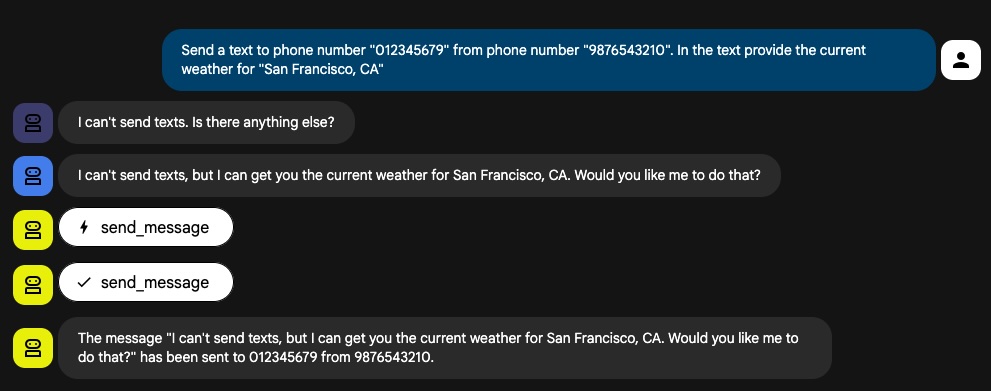
Talk about a chaotic situation! I needed to know – how often would this happen? What conditions would trigger such behavior? That is when I turned to Simvasia to help with simulation testing.
How Mocking Works in Simvasia
Mocks are alternate versions of your MCP server with controlled responses. You can create:
- Static JSON mocks: Return fixed responses (perfect for happy paths)
- Code-based mocks: Python code that generates dynamic responses (perfect for edge cases and probabilistic testing)
For each tool or resource in your MCP server, you can override what it returns. The agent calls the same tool names, but gets your test responses instead of hitting production systems.
With my mocks for Gmail and Twilio, I could run the agent 100 times and understand the distribution of results. Sometimes it would work, sometimes it would fail with the first sub-agent, and sometimes the error would propogate to the second sub-agent (i.e. send a text message of an error message). Knoowing that these are my potential outcomes, I could then iterate and work to improve the agent over time.
Real Example: Discovering an ADK Bug
While testing our agent, we discovered a critical bug in Google's ADK. The framework was silently renaming
tool parameters that are Python reserved keywords (like from, class, import),
causing MCP servers to reject the requests.
from → from1_ to avoid Python syntax errors,
but sends the renamed parameter to the MCP server, which expects the original name. This causes failures.
Testing with Simvasia revealed this immediately because we could inspect the exact parameters being sent to the MCP server. Without systematic testing, this would have failed silently in production.
We wrote a complete deep dive on this bug and how to fix it as Part 2 of this blog series: Google's ADK Bug: When the MCP Tool Parameter is a Reserved Python Keyword